The four workbooks you keep beside the general ledger
Fixed assets, prepaid expenses, leases and loans, and Texas property tax renditions, on one close, posted into QuickBooks Online or Desktop.
Sample Company, fixed asset register
October 2026 closed| Asset | Cost | Accumulated | October entry |
|---|---|---|---|
| FA-0102 CNC machining center | 148,500.00 | 80,437.50 | 1,237.50 |
| FA-0107 Forklift | 33,600.00 | 31,360.00 | 560.00 |
| FA-0114 Delivery truck | 68,400.00 | 43,320.00 | 1,140.00 |
| FA-0121 Office build-out | 96,000.00 | 34,000.00 | 1,000.00 |
| Total | 346,500.00 | 189,117.50 | 3,937.50 |
See it at work
The register, an asset, a month finalized and its journal entry, prepaid, leases and loans, and a Texas rendition.
Demo Company, sample data.
- The depreciation workbook has one author, and nobody else opens the formulas.
- A formula dragged one row too far in the prepaid tab stays wrong until somebody ties it out.
- The auditor samples it every year and asks the same questions.
- Someone re-keys the journal entry by hand every month.
Each one replaces a tab in the same workbook
Four registers in one subscription.
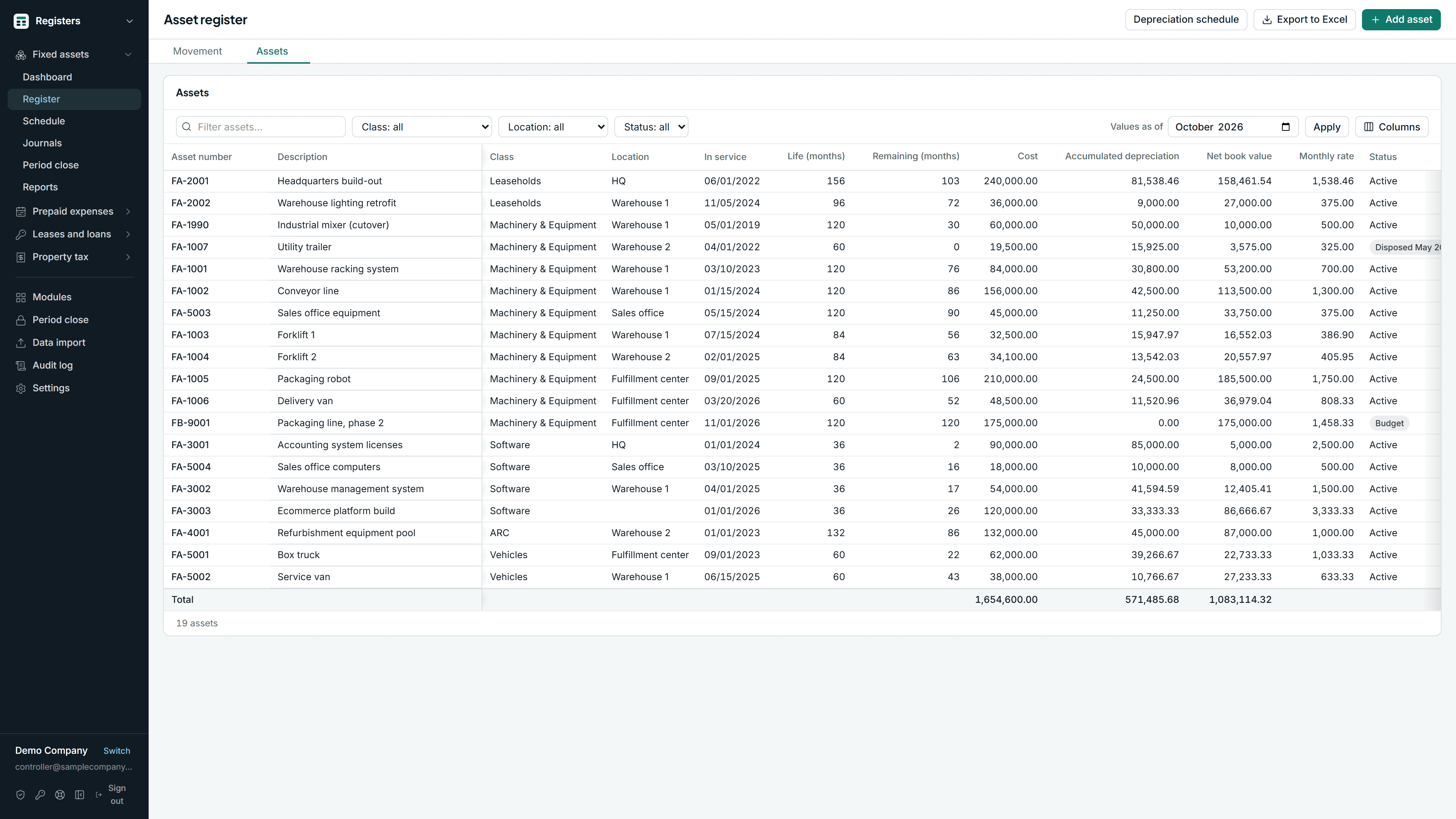
The depreciation workbook
Fixed assets →
An asset register with book and tax depreciation
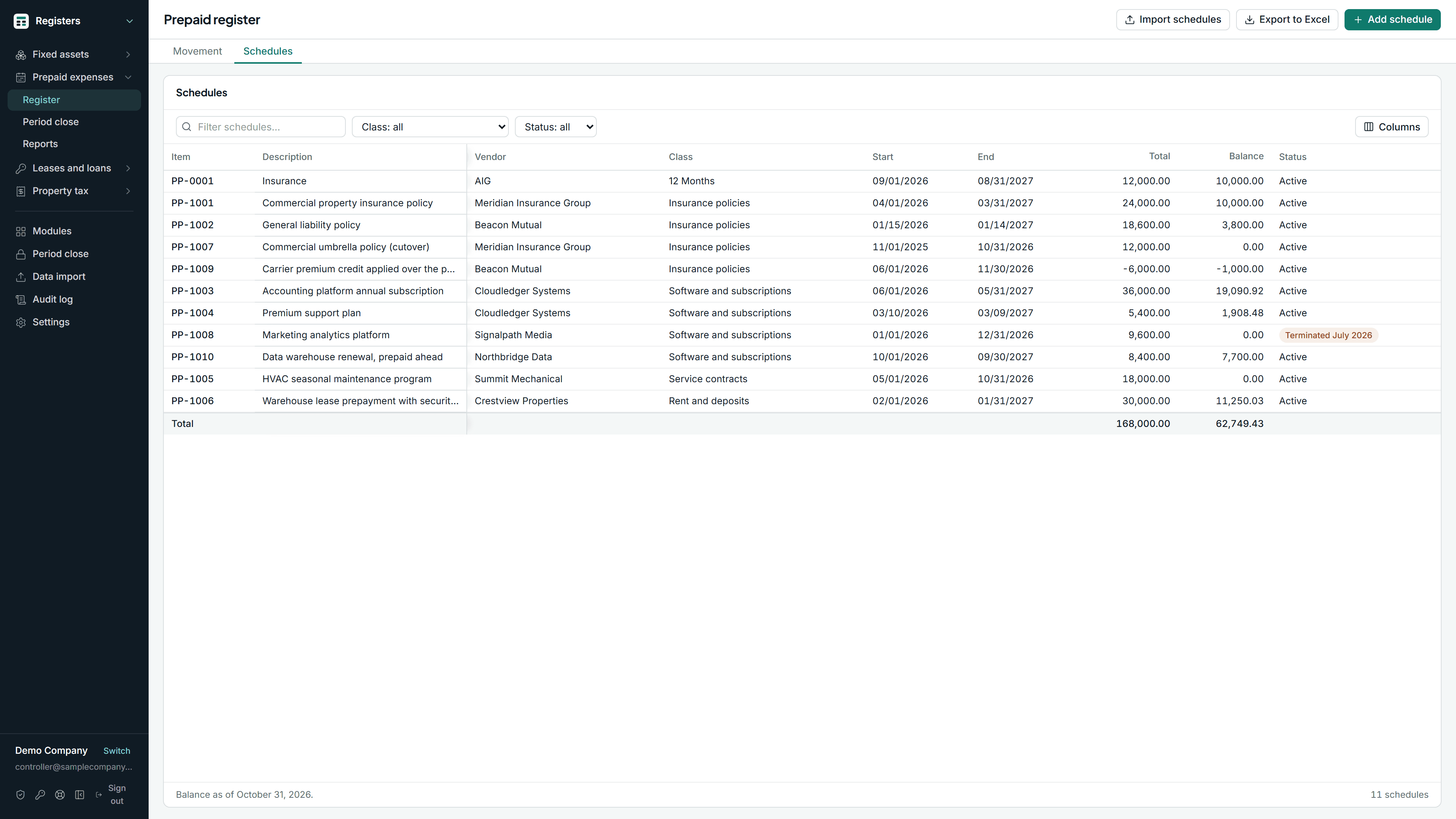
The prepaid schedule tab
Prepaid and deferred expenses →
Amortization schedules and the monthly entry that comes off them
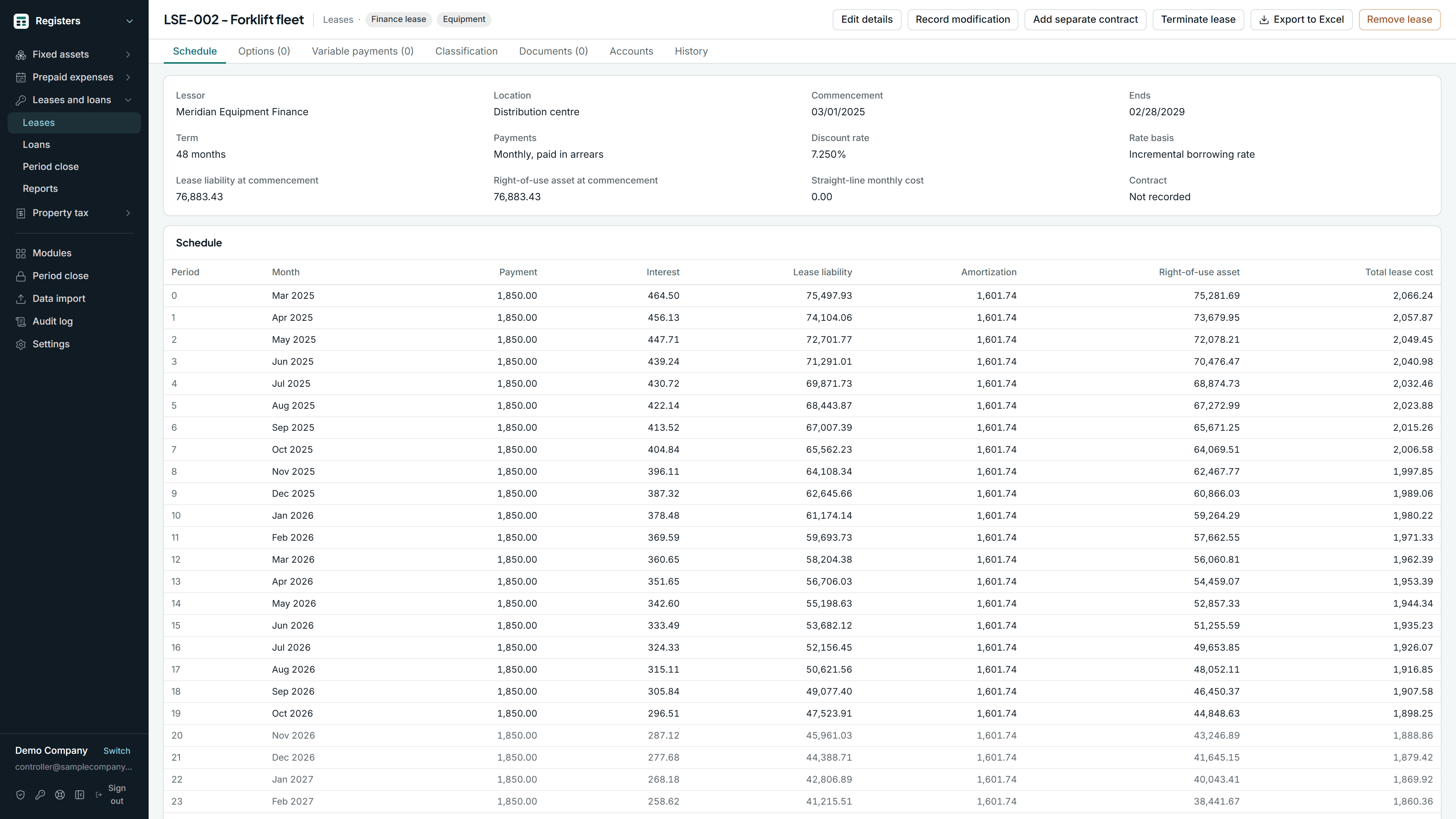
The lease and loan spreadsheets
Leases and loans →
Lease liabilities and right-of-use assets under Accounting Standards Codification 842, and notes payable, on the same effective interest schedule
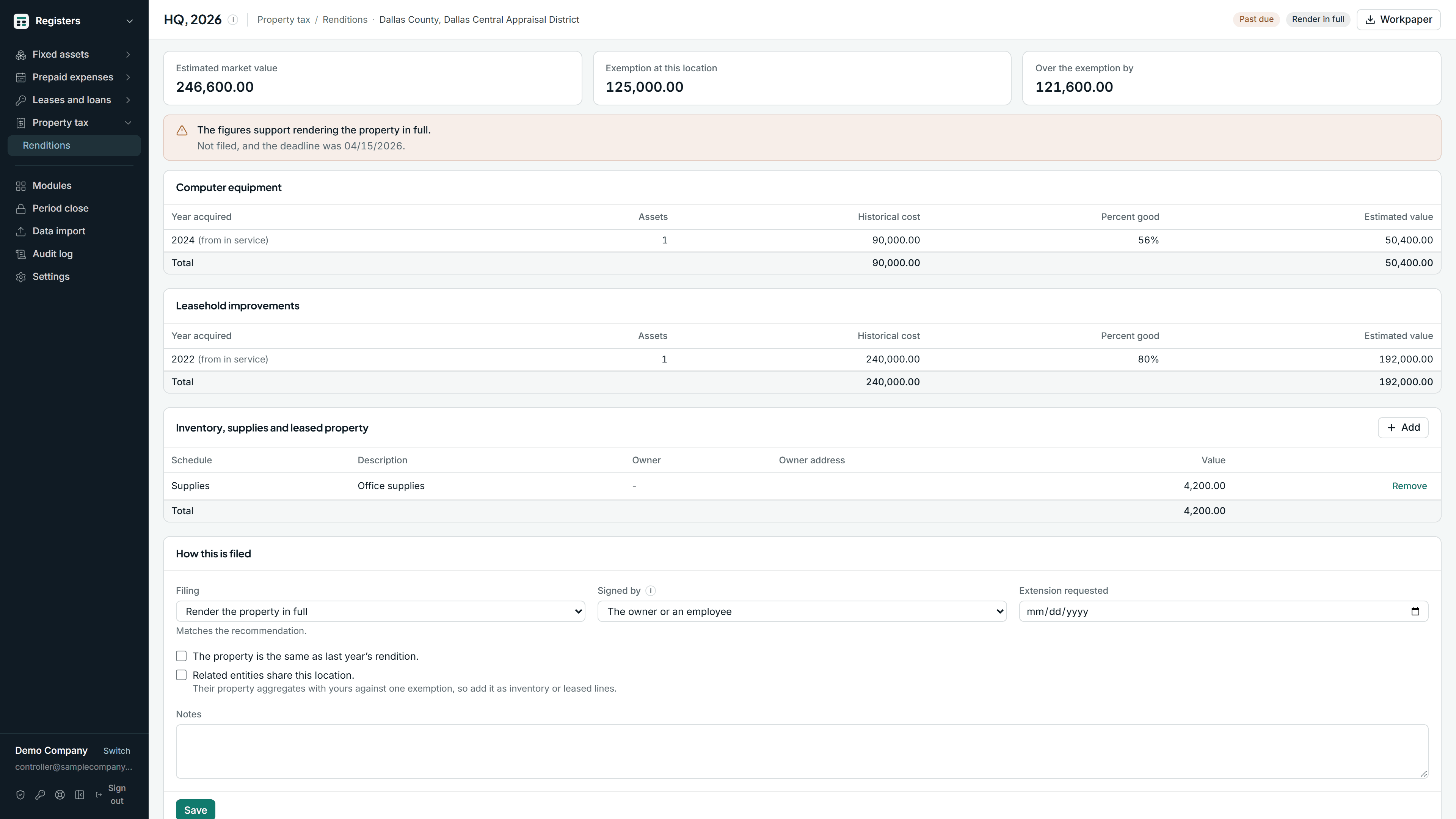
The rendition worksheet
Property tax renditions →
Texas business personal property renditions, built from the register you already keep
A filed month stays filed
Finalizing a month files a snapshot of the schedule and blocks any edit dated inside it. A closed month changes only through a recorded reopen.
In a spreadsheet, any cell can be edited afterward and nothing records it.
FA-0114 Delivery truck · Depreciation schedule
| Period | Depreciation | Accumulated depreciation | Net book value | Status |
|---|---|---|---|---|
| June 2026 | 1,140.00 | 38,760.00 | 29,640.00 | Closed |
| July 2026 | 1,140.00 | 39,900.00 | 28,500.00 | Closed |
| August 2026 | 1,140.00 | 41,040.00 | 27,360.00 | Closed |
| September 2026 | 1,140.00 | 42,180.00 | 26,220.00 | Closed |
| October 2026 | 1,140.00 | 43,320.00 | 25,080.00 | Closed |
| November 2026 | 1,140.00 | 44,460.00 | 23,940.00 | Open |
How it works
01
Import what you keep now
Fill the import template and upload it as a CSV: assets, usage, disposals, impairments, prepaid schedules, leases and loans, with mid-life balances. Every row is checked before anything is written, and the same file cannot load twice.
02
Close the month once
Every register closes together, in order, and locks. The audit trail is append-only, and reopening a month is an administrator action with a reason on it.
03
Post to QuickBooks
Online with one click, or Desktop with one Web Connector run, from the same close. Or download the entry as a file and import it yourself.
One close across four registers
Months close in order and lock across every register at once.
An append-only audit trail
Every posting, edit, disposal and reopen is recorded with who did it and when.
Accounts you configure
An asset class, a prepaid class or a lease class names the accounts it posts through. Anything it does not name uses your default accounts.
Excel export
Every register, schedule and report exports to Excel, and every journal entry downloads as a CSV, including after a subscription lapses.
What a fixed asset tool usually leaves out
QuickBooks Online Advanced carries book depreciation. The cloud fixed asset tools carry tax depreciation and, on their higher tiers, leases. Neither reaches QuickBooks Desktop, and neither closes a month.
| Capability | Steda Registers | QuickBooks Online Advanced | A cloud fixed asset tool |
|---|---|---|---|
| Book depreciation | Yes | Yes, on Advanced only | Yes |
| Tax depreciation: MACRS, Section 179, bonus, the alternative system | Yes | No | Yes |
| State books as conformity switches | Yes | No | Partly |
| Construction in progress, transfers, impairments, partial disposals | Yes | No | Yes |
| Prepaid and deferred expense schedules | Yes | No | No |
| Leases and loans under Accounting Standards Codification 842 | Yes | No | Yes, priced per lease |
| Texas property tax renditions from the register | Yes | No | No |
| Period close with locked months and an audit trail | Yes | No | No |
| QuickBooks Desktop, including Enterprise | Yes | Not applicable | No |
From published product documentation and pricing pages, read September 2026. The last column describes the category rather than one vendor, because their tiers differ; check the one you are comparing.
It posts into QuickBooks Desktop Enterprise
Cloud tools in this category tend to stop at QuickBooks Online. Steda posts into the company file.
Into the company file
Connects through the Web Connector and posts the monthly journal entries into the company file, from the same registers that post to QuickBooks Online.
The right company file
Checks the company file before posting, so a run cannot post to the wrong one.
Moving to QuickBooks Online later
The registers and their closed months stay in Steda. Disconnect Desktop, connect Online and keep closing.
What the spreadsheet register costs you
Your hours at your rate, against the published price for one entity. Change any figure.
We keep assets on the register.
Maintaining it takes hours a month, at $ an hour fully loaded.
The auditor costs us another hours a year in preparation.
That price includes the four registers, the close and both connectors. See every figure.
Steda is shown at the published monthly rate for one entity; annual billing is two months cheaper. The spreadsheet side counts time only, not the cost of a restated depreciation entry or an audit finding.
Against what you already pay for
Each comparison gives a verdict on every row and links every claim about QuickBooks to Intuit’s documentation.
- Steda Registers and Fixed Asset ManagerFixed Asset Manager ships inside QuickBooks Desktop Premier Accountant and Enterprise at no extra cost and calculates depreciation on six bases. If it is working for you, keep it.
- Steda Registers and QuickBooks Online AdvancedQuickBooks Online Advanced has a fixed asset feature that creates a schedule and posts book depreciation every month on its own. It is useful, and already in a plan some companies pay for. The gap is the tax book.
Questions
Which depreciation methods are here?
Can I bring a lease or a schedule that is already running?
Is the register import previewed row by row?
Does it file my Texas rendition?
Does it cover lessor accounting or IFRS 16?
The other product, Steda Receivables, covers collections: the aging, the worklist, reminders you approve, and a portal where your customers pay you. Both together are $329 per month for the first entity.